🎯 TL;DR
- No experience required. Hackathon teams need designers, domain experts and presenters as much as coders, and mentors and workshops are there to support first-timers.
- You learn by building. You pick up new tools by applying them to a real challenge under a deadline, with expert feedback while you work.
- You leave with more than a result. A working prototype for your portfolio, new professional contacts, and a chance at prizes and post-event programs.
- Preparation decides the outcome. Every hackathon follows five stages: find and register, prepare, pack, build and follow up. Getting the first three right protects your time for the fourth.
A hackathon is a time-boxed event where participants form teams to build a working prototype in response to a set challenge, usually over 24 to 48 hours. Events run in person, online or as a hybrid of both, and typically include workshops, mentor support and a final round of judging.
If you are worried about being the least experienced person in the room, you are in good company. A well-run hackathon is designed with first-timers in mind, and the structure is there to take you from not knowing where to start to presenting something that works. This guide explains what to expect at each stage and what to bring.
You don’t need to code to belong at a hackathon
Requirements vary by event, but by the submission deadline a team is typically expected to deliver three things: A working prototype, a pitch or demo, and a written submission.
Producing all three in a short window takes more than code. A strong team covers four roles, and three of them do not require programming skills. If you are unsure where you fit, start with the role closest to what you already do well.
💻 Builder: Turns the idea into the working prototype. Builders write the code, connect the tools and data the challenge requires, and keep the prototype stable enough to run during the demo.
🎨 Designer: Shapes how the prototype looks and how users move through it. Designers produce the screens and visuals that make the demo easy for judges to follow, and often prepare the slides for the pitch.
🧭 Domain expert: Makes sure the team is solving a real problem. Domain experts bring knowledge of the industry or users involved, test the idea against real needs, and supply the context that makes the pitch credible.
🎤 Presenter and project lead: Keeps the team on schedule and owns the final story. They agree the scope, track progress against the deadline, write the written submission and deliver the pitch to the judges.
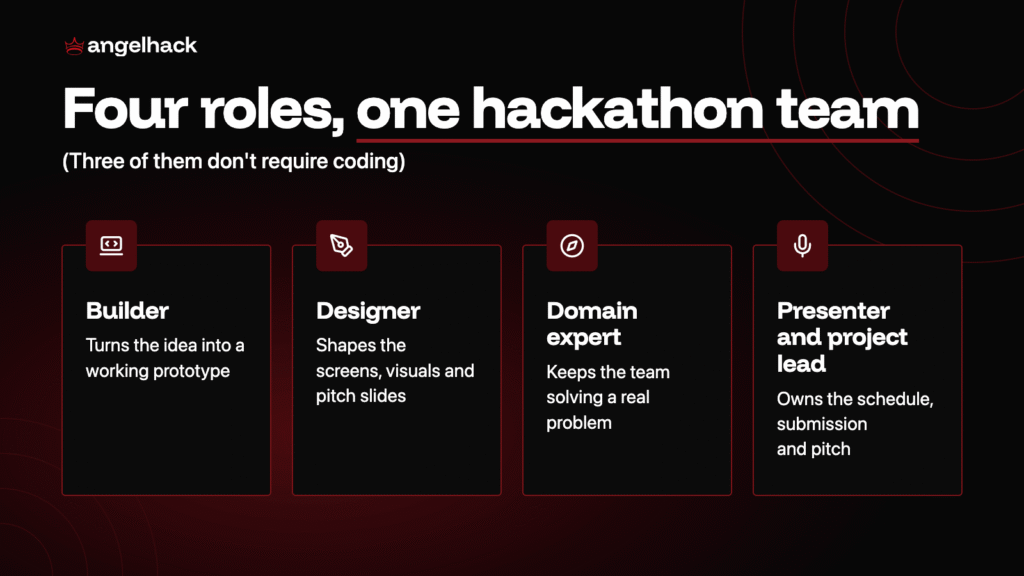
On a small team, one person may cover two roles. What matters is that every part of the final deliverable has a clear owner by the end of kickoff.
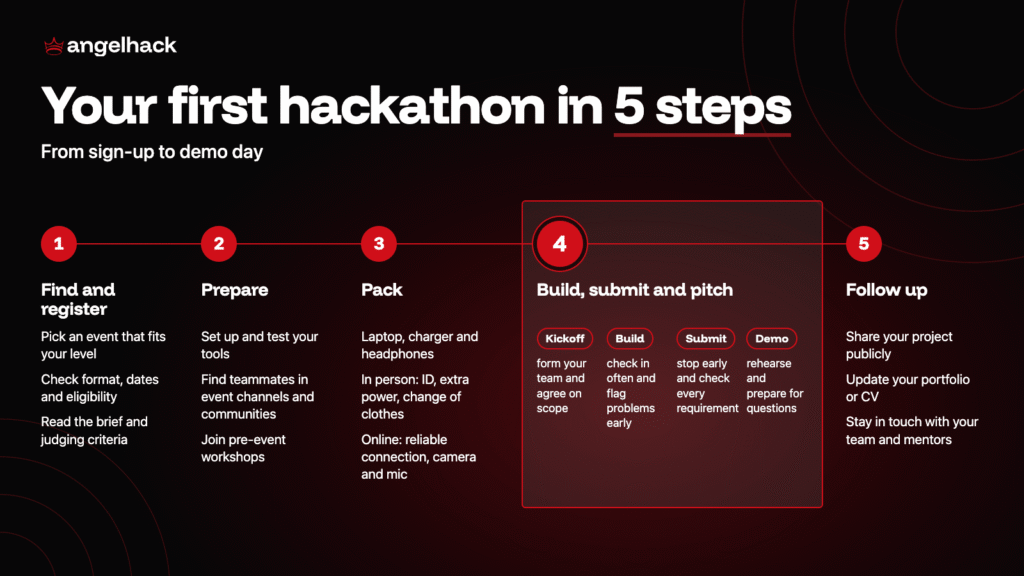
Step 1: Find a hackathon and read the challenge brief
Start by finding a hackathon that matches your interests, through hackathon listing platforms, organizer event calendars or developer communities. Confirm the format, dates, eligibility, team size and whether you can register solo. Events with a novice track, workshops or mentor support are a good fit for a first attempt.
Once registered, read the brief for the challenge tracks, the judging criteria, the tools you are expected to use, and what you need to submit and by when. Write down the three things judges care about most, and keep every build decision tied to them.
⚠️ Rookie mistake: registering for a hackathon that is too advanced or too competitive for your current level. For a first attempt, look for events with a novice track, workshops or mentor support.
Step 2: Use the week before to set up and find your team
The week before the event is the time to remove anything that could slow you down once the build begins.
- Get your tools ready: Set up and test the software and accounts the brief asks for, and check the event’s rules on AI tools.
- Find teammates: Introduce yourself in the event’s community channels, developer communities and on social media, with your skills and the challenge you want to work on.
- Shortlist problems: Narrow your ideas down to two or three specific problems from the brief that your team could realistically solve within the event, so you arrive at the hackathon with options ready to work on.
- Plan your time and attend pre-event workshops: Clear your schedule, arrange travel if needed, and join any sessions covering the tools you will use.
Arriving prepared means you can focus on the challenge from the first hour and give your team more time to refine the prototype and pitch.
Step 3: Pack for the format you’re attending
For any format:
💻 Laptop and charger
🎧 Headphones
📓 Notebook for sketching ideas.
In person:
• ID and registration confirmation
• A power bank or extension cord
• A change of clothes
• Personal essentials
• A reusable water bottle.
Online:
• A reliable internet connection with a mobile hotspot as backup
• A working camera and microphone
• A quiet space
• The event schedule converted to your time zone
Useful extras:
- Spare cables or adapters
- Light jacket, as event venues can run cold
- Snacks for late-night build sessions
- Any medication you take regularly
- A portfolio link or business cards ready to share
Step 4: Build, submit and pitch as one team
Whatever its length or format, every hackathon moves through four phases.
Kickoff and team formation
The event opens with the challenge reveal and time for teams to form and plan.
- Form a team or decide to go solo. If you arrive without a team, join team-matching and share your skills and interests. If the rules allow solo entries, consider whether you can cover the prototype, pitch and submission on your own. Teams should aim to cover the four roles, so each part of the deliverable has an owner.
- Agree on one idea and its scope. Compare options against the judging criteria, pick the one your team can finish in time, and list which features are essential and which are optional.
- Plan the timeline backward. Work back from the submission deadline to set when the core feature must work, when building stops and when the pitch is rehearsed.
The build
Teams work on their prototypes, with mentor and workshop support. How well your team communicates decides how much of the plan gets built.
- Set up one shared workspace. Agree on one channel for messages and one place for files, code and notes, so nobody works from an outdated version.
- Use sponsor experts. Sponsor engineers at the event know their tools best, so bring them questions about their platform before you sink time into a workaround.
- Hold short, regular check-ins. Every few hours, each person shares what they finished, what they are working on and what is blocking them. Act on blockers immediately.
- Decide quickly and record decisions. When the team disagrees, test each option against the judging criteria, decide, and note the outcome so the discussion does not restart.
- Flag problems early. If a task is running long, say so at once so the team can reassign work or cut scope while there is still time.
- Prepare for mentor sessions together. Agree on what to ask before each session, then share the advice with the whole team.
- Look after each other. On longer events, take turns resting and keep feedback constructive, since tired teams communicate less clearly.
Submission
Building stops at the deadline, and teams upload their prototype, demo materials and written submission.
- Stop building before the cutoff. Leave time to test the prototype, fix what breaks and submit early, as last-minute uploads can fail.
- Prepare a backup. Record a short demo video or take screenshots in case the live demo fails.
- Complete the written submission. Describe the problem, your solution, how it works and what you would build next.
- Check every requirement. Before you upload, compare your submission against the brief, including file formats, links and video length.
Demo and judging
Teams present to the judges and answer questions, then winners are announced at the closing ceremony.
- Rehearse the pitch together. Run through the problem, your solution, a live demo and how it meets the judging criteria, and time it against the limit.
- Watch the other demos. Seeing how other teams approached the same challenge gives you ideas and benchmarks for your next hackathon.
- Prepare for questions. Judges may ask about technical choices, feasibility or next steps, so agree in advance who answers what.
Step 5: Follow up after the hackathon
What you do in the week after the event determines how much value you keep from it.
- Tidy up your project. Clean up the code, files and description so others can understand what you built.
- Share your work publicly. Post the project on your professional profiles with a short summary of the problem and your role.
- Update your portfolio or CV while the details are still fresh.
- Stay in touch. Connect with your teammates, mentors and the contacts you met.
- Explore next steps. Check whether the event offers follow-on programs, such as bounties or incubators, for promising projects.
Team Pandamonium, five students from the National University of Singapore, won the Novice track of the BrainHack 2026 TIL-AI competition on their first attempt at machine learning. None of them had used the core tools before the event. As the team put it: “Walking into the room the first time was intimidating.” Their advice to anyone considering a first hackathon: “Don’t think, just go.”
What you gain from your first hackathon
First-time participants come away with benefits that last well beyond the event.
- Problem-solving skills. You learn how to develop a working solution to a real-life or business problem using a pre-defined tech stack.
- Teamwork under pressure. You practice scoping a project, dividing work and making decisions against a fixed deadline, skills that carry directly into professional work.
- A portfolio piece. You leave with a working prototype you can show recruiters, add to your portfolio or reference in applications.
- Expert feedback. Mentors and judges review your work while it is fresh, which gives you a clear view of your strengths and what to improve next.
- Confidence for the next one. Completing a full cycle, from idea to demo, shows you what you can deliver in a short time and makes your next hackathon far less daunting.
- A professional network. You work alongside teammates, mentors, sponsors and organizers, and those connections can lead to future teams, collaborations or roles.
Final Words
The best way to prepare for your first hackathon is to actually choose one. Pick an event that matches your interests, read its brief and register this week. From there, the five steps in this guide will get you to demo day – ready to present work you are proud of.

FAQs
Can I go to a hackathon with no coding experience?
Yes. Teams need designers, domain experts and presenters as well as builders, and mentors and workshops are there to help first-timers get started. Look for events with a novice track or open eligibility.
What should I bring to my first hackathon?
For any format, bring a laptop, charger and headphones. In person, add ID, extra power, a change of clothes and a water bottle. Online, add a reliable connection, a working camera and a quiet space.
Do I need a team before I register?
Check the event’s rules. Where solo registration is allowed, you can join team-matching at kickoff. You can also find teammates beforehand through the event’s community channels, developer communities and social media.
What can give me the best chance of winning a prize at my first hackathon?
Build around the judging criteria from the start, keep the scope small enough to finish, and leave time to rehearse. A working demo with a clear pitch tends to score better than an ambitious idea that is only half built.
What should I pay most attention to at my first hackathon?
Focus on the challenge brief, your team’s scope and the submission deadline. Use mentors and workshops when you get stuck, and treat the experience itself as the main goal. The skills and contacts you gain last longer than any result.