🎯 TL;DR
- A vibe coding hackathon is worth attending if you have a real problem to solve or want to learn AI coding tools quickly. AI writes much of the code, so designers, product managers and domain experts can compete too.
- The main worries are unclear roles, polish beating engineering, copied apps, uneven tool access and fragile AI code. Each one is manageable with the right event and preparation.
- Teams that do well plan before they prompt, keep prompts small, commit often and verify every change by hand.
- Pick one or two AI tools and test them before the event, such as v0 or Google Stitch for screens, Lovable or Bolt for full apps, and Cursor, Codex or Claude Code for coding.
A vibe coding hackathon is a time-boxed event where you build with AI coding tools, describing what you want in plain language while the AI writes most of the code and your team steers, tests and polishes the result.
The format is drawing a crowd. Bolt.new’s World’s Largest Hackathon had more than 130,000 builders registered in 2025. Anthropic’s first global Claude Code hackathon drew 13,000 applicants in early 2026, and four of its five winners weren’t professional developers.
Common worries about vibe coding hackathons, and what actually happens
We hear these seven concerns from participants again and again. Here’s each one, along with how it tends to play out.
“I’ll have nothing to do if one person vibe codes everything.”
The worry: One teammate generates most of the project with AI, and the rest of the team ends up watching. First-timers feel this most.
What actually happens: AI moves the work rather than removing it. Someone still has to research the problem, test each build, design the user flow and prepare the pitch. Teams that assign owners in the first hour keep everyone busy, and first-timers often shine as testers or domain experts.
“Judges reward polish over real engineering.”
The worry: A slick AI-built interface scores higher than careful architecture, even when the code underneath is fragile.
What actually happens: It depends on the rubric. At well-run events, judges test whether the product works and push on how it was built. A polished demo that falls apart under questions rarely keeps its lead, so check the judging criteria before you register.
“Someone will clone an existing app and win.”
The worry: AI can rebuild a known product in a few hours, and a fast copy gets rewarded as innovation.
What actually happens: Judges ask what’s new and who it serves, and a straight copy struggles to answer both. A clone shows speed, but it rarely beats a team solving a problem it knows firsthand. That understanding is the part an AI tool can’t hand you.
“Teams with paid AI tools have an unfair edge.”
The worry: Premium plans offer stronger models and higher limits, while free tiers run out mid-build.
What actually happens: Some programs provide tool credits or limit which tools teams can use, which keeps the field more level. Free tiers can cover a short build if you plan your prompts carefully. Check the rules and any partner offers before you pay for a subscription.
“I won’t learn real skills.”
The worry: Leaning on AI skips the fundamentals, leaving beginners with an app they can’t explain or fix.
What actually happens: You practice scoping, prompting, checking AI output and explaining technical choices under time pressure. You still need fundamentals like version control on GitHub and debugging, because you’ll use them whenever the AI gets something wrong. The event trains both sides, not a shortcut past the basics.
“AI code breaks at the worst moment.”
The worry: AI output looks right but misses edge cases, long sessions drift, and big prompts overwrite working code.
What actually happens: Most breakages come from skipped checks, not the tools themselves. Teams that test after every change, save working versions and restart drifting sessions avoid most last-minute failures. The tips later in this guide show how to build those habits in.
“Hackathons are turning into prompt contests.”
The worry: Experienced developers wonder what sets their skills apart when everyone is vibe coding.
What actually happens: Strong coders still stand out, because they can review AI output, fix its mistakes and make the architecture calls the AI can’t. They also move faster, with AI handling the groundwork. At events with live judging, that depth shows as soon as judges ask how the product works.
Is a vibe coding hackathon worth it for you?
For many builders, the answer is yes, as long as you pick the right event and walk in prepared. The format rewards people who can spot a real problem and steer AI tools toward a fix, which opens the door well beyond experienced developers. Here’s who gets the most out of it, plus a quick check to help you decide.
Who gets the most out of it
🚀 You have an idea but limited coding experience. AI tools handle much of the implementation, so if you can describe a problem clearly, you can turn it into a working prototype within the event.
🔍 You bring knowledge a pure coder doesn’t have. When code comes quickly, the person who understands the user and the problem often shapes the outcome, which is why designers, product managers and domain experts can compete.
⚙️ You want to get comfortable with AI coding tools quickly. You’ll scope, prompt, test and fix against a real deadline, with mentors close by, which is hard to replicate on your own.
📋 You value proof of work as much as prizes. You leave with a working prototype for your portfolio, feedback from judges and contacts who can lead to your next team or role.
🛠️ You’re an experienced developer who wants to move faster. AI takes over the boilerplate, so you can spend your time on architecture, reviewing the AI’s output and the hard problems that decide the result.
Quick check: worth it or think twice
Not sure which side you’re on? Read down each column and count which one describes you better. If most of your answers land on the left, the format will likely pay off. If several land on the right, choose your event carefully or go in with a clearer plan.
| Worth it if | Think twice if |
|---|---|
| You have a real problem you want to solve | You want to be judged only on hand-written code |
| You’re a designer, product manager or domain expert who wants to build | You want to learn programming fundamentals step by step |
| You want to get comfortable with AI coding tools quickly | You’re uncomfortable shipping something rough in a short time |
| You value feedback and contacts as much as prizes | Winning is your only measure of success |
| You’re ready to review and test what the AI produces | You expect the AI to deliver a finished product on its own |
Before you go: the vibe coding tools you’ll likely use
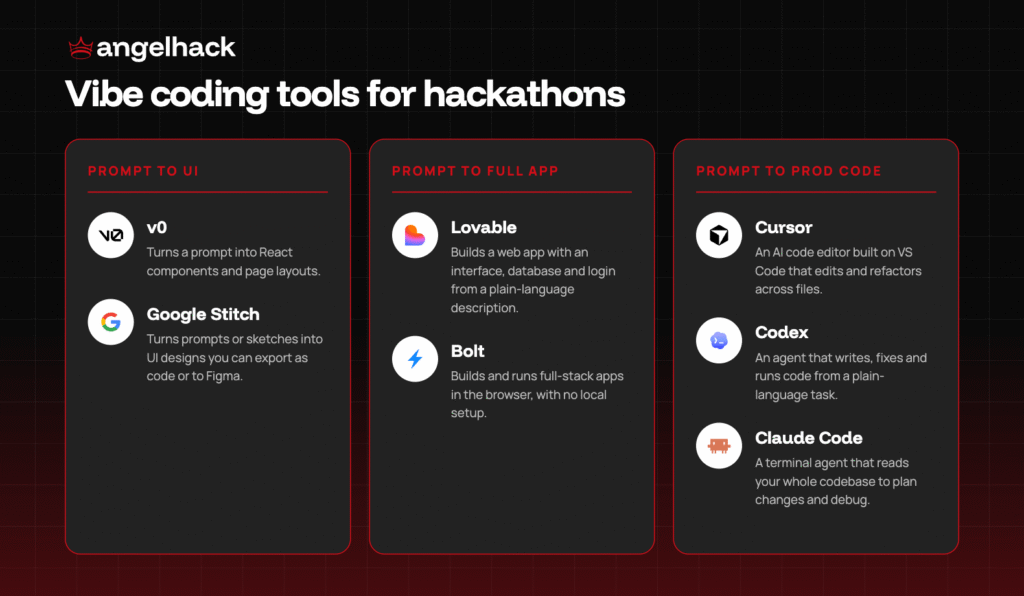
You won’t need every tool on the market, so check the event’s AI rules and pick one or two that suit your team.
From prompt to UI
v0. Vercel’s AI builder turns a prompt into React components and page layouts, so you can get the screens for your core flow up quickly. It’s strongest on the interface, so plan how you’ll connect data and logic behind it.
Google Stitch. Google’s design tool turns text prompts or rough sketches into UI designs you can export as front-end code or to Figma. Use it to try a few layouts before you commit to one.
From prompt to a full app
Lovable. It builds a web app with an interface, database and user login from a plain-language description, which suits teams with fewer coders. Check any generated login and data handling by hand before you demo.
Bolt. StackBlitz’s tool builds and runs full-stack apps in the browser with no local setup, so the whole team can work from one link. Big prompts can overwrite code that already works, so save versions as you go.
From prompt to production-ready code
Cursor. This AI code editor, built on VS Code, can edit several files at once, refactor code and answer questions about your project. Read through large suggested changes before you accept them.
Codex. OpenAI’s coding agent takes a task in plain language, writes or fixes the code, and can run it to check its own work. Check each change against your core flow before you move on.
Claude Code. Anthropic’s coding agent runs in your terminal and reads your whole codebase, so it can plan changes across files and debug complex logic. If a long session starts to drift, restart it with clear context.
Keep it to two tools, one to scaffold and one to refine, and test both the week before so event day isn’t spent learning a new interface. Then it’s time to plan how your team works on the day.
On the day: tips to get the most out of a vibe coding hackathon
Here are 6 habits we see again and again in teams that finish strong.
1️⃣ Plan before you prompt
Spend the first 30 minutes asking the AI for a folder structure, data model, API routes and component list, then cut the scope to one core flow. Jumping straight into prompts wastes time you’ll need later.
2️⃣ Keep a context file and prompt in small steps
Write down your problem, user, tech stack and top judging criteria, and paste it into each new AI session. Then ask for one feature or file at a time, naming its inputs and outputs, so the AI doesn’t rewrite parts you didn’t ask it to touch.
3️⃣ Commit after every working change
Save versions with GitHub so a bad generation means a quick rollback instead of a rebuild, and clear out leftover files the AI creates along the way.
4️⃣ Verify every output yourself
Run the code, click through the real user flow and paste exact error messages back to the AI. Check login, data handling, deployment and API calls yourself, since these are details the AI can easily miss.
5️⃣ Restart sessions that start to drift
When the AI repeats old answers or ignores instructions, open a fresh session with your context file, and switch tools if one keeps blocking you.
6️⃣ Give each teammate a clear job
One person drives the prompts, another reviews and tests every change, and a third owns the user flow and the pitch, while the whole team decides what to build and what to cut.
See these habits in action in our participant stories, where winning teams share how they built, what broke and what they’d tell first-timers.
Final Words
You don’t need to be an expert coder to get a lot out of a vibe coding hackathon, as long as you pick an event with clear rules and show up with a real problem and a role you own. You’ll leave with a working prototype, new skills and people worth building with again.
When you’re ready, browse the ongoing vibe coding hackathons and find a challenge that fits your problem.
If you’re planning to run a vibe coding hackathon for your own community or team, contact us for a consultation.
Planning a Vibe Coding Hackathon?
We’ll Help You Run It
Reach 500k+ developers through a partner with 15+ years and 450+ events of proven experience. Book a consultation and we’ll map your goals, close the gaps, and build the structure that gets you there.
Schedule Your CallFAQs
Is a vibe coding hackathon worth it for beginners?
Yes, as long as the event offers team matching, onboarding and mentors to help you find your role and finish a working prototype.
Can non-coders win a vibe coding hackathon?
Yes, because AI tools handle much of the implementation, so you can compete on problem choice, design and pitch while still testing the build yourself.
Do I need a paid AI tool to compete?
Not always, since free tiers often cover a short build and some events provide credits, so check the rules before you pay.
How long does a vibe coding hackathon last?
It ranges from a few hours to several days, and the event page lists the schedule, submission deadline and judging format.
Can I join a vibe coding hackathon solo?
Often, yes, where the event allows solo registration and runs team matching at kickoff, so say hello in its community channels early.